Everything your recorder heard, transcribed and organized on your Mac. Nothing leaves it.
Mnemo pulls recordings straight off your Plaud, then transcribes, labels speakers, writes the notes and files the facts into a knowledge base — all on your own machine. There is no cloud to trust, because there is no cloud.
Apple silicon Mac, macOS 13 or later. Notarized by Apple; updates arrive inside the app.
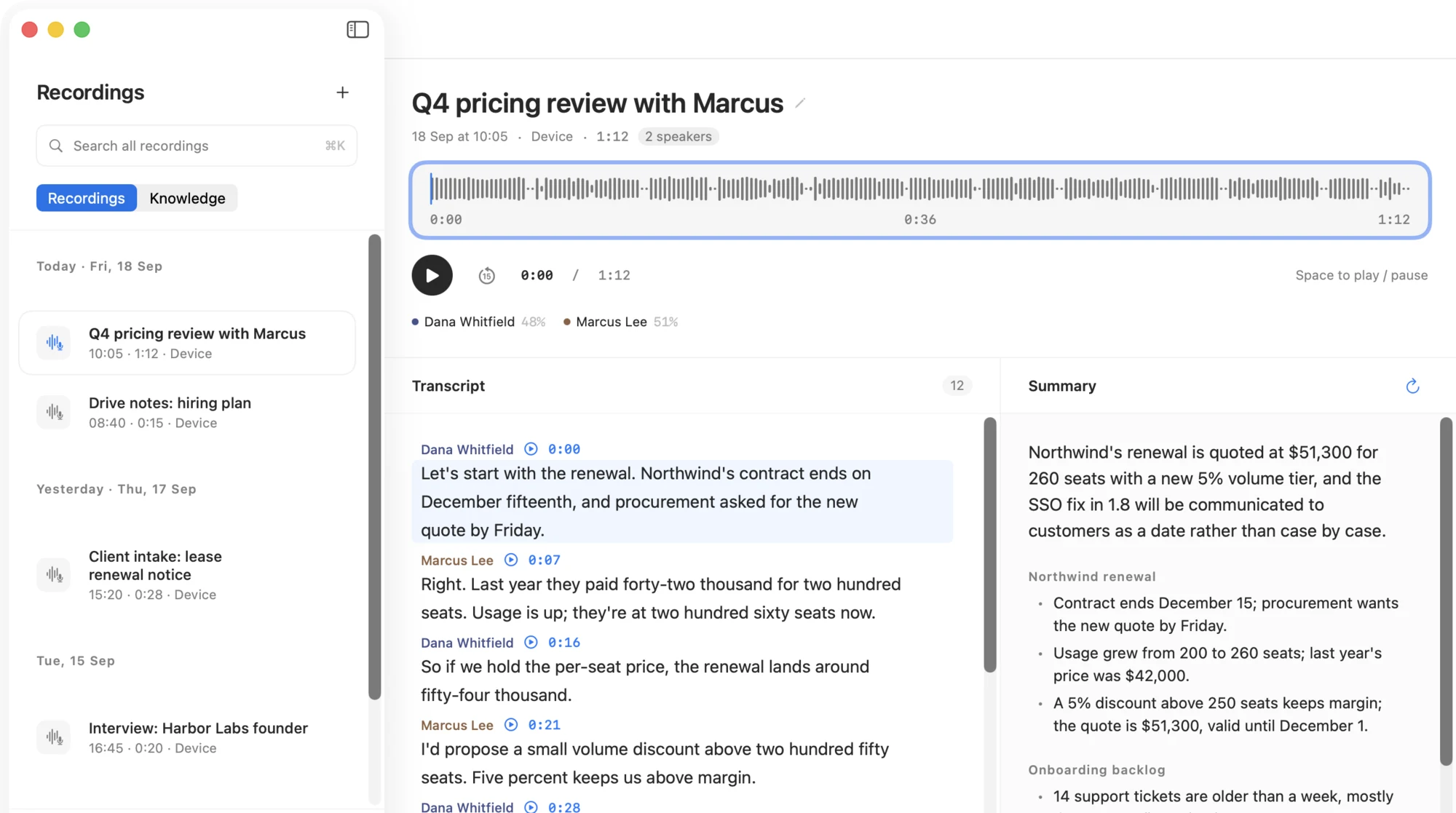
A synced recording after Mnemo is done with it: transcript by speaker, summary by topic, every line one click from the audio. (Demo data.)
Walk in with your Plaud. Sit down to finished notes.
Mnemo connects to the recorder directly over Bluetooth (or Wi-Fi for big batches), decrypts new recordings on your Mac and gets to work. No phone in the loop, no upload step, no waiting on someone else's servers.

Transcripts that know who said what
Speech recognition runs on the Mac with Qwen3-ASR; speaker separation runs alongside it. Each line carries a speaker, a timestamp and the words — rename “Speaker 2” to a real name once and every line follows.
- Summaries shaped by the content: a one-line overview, then sections by topic, with decisions, action items and open questions only when they exist.
- Notes come out in the language of the recording — an English meeting gets English notes even if your Mac is set to Chinese.
- Unsure lines are marked instead of guessed. Long silences split a marathon recording into chapters.
*Diarization: sherpa-onnx with a CAM++ speaker model. 4.8% is the time-weighted error rate on our internal set of four labelled recordings; real rooms and microphones vary.
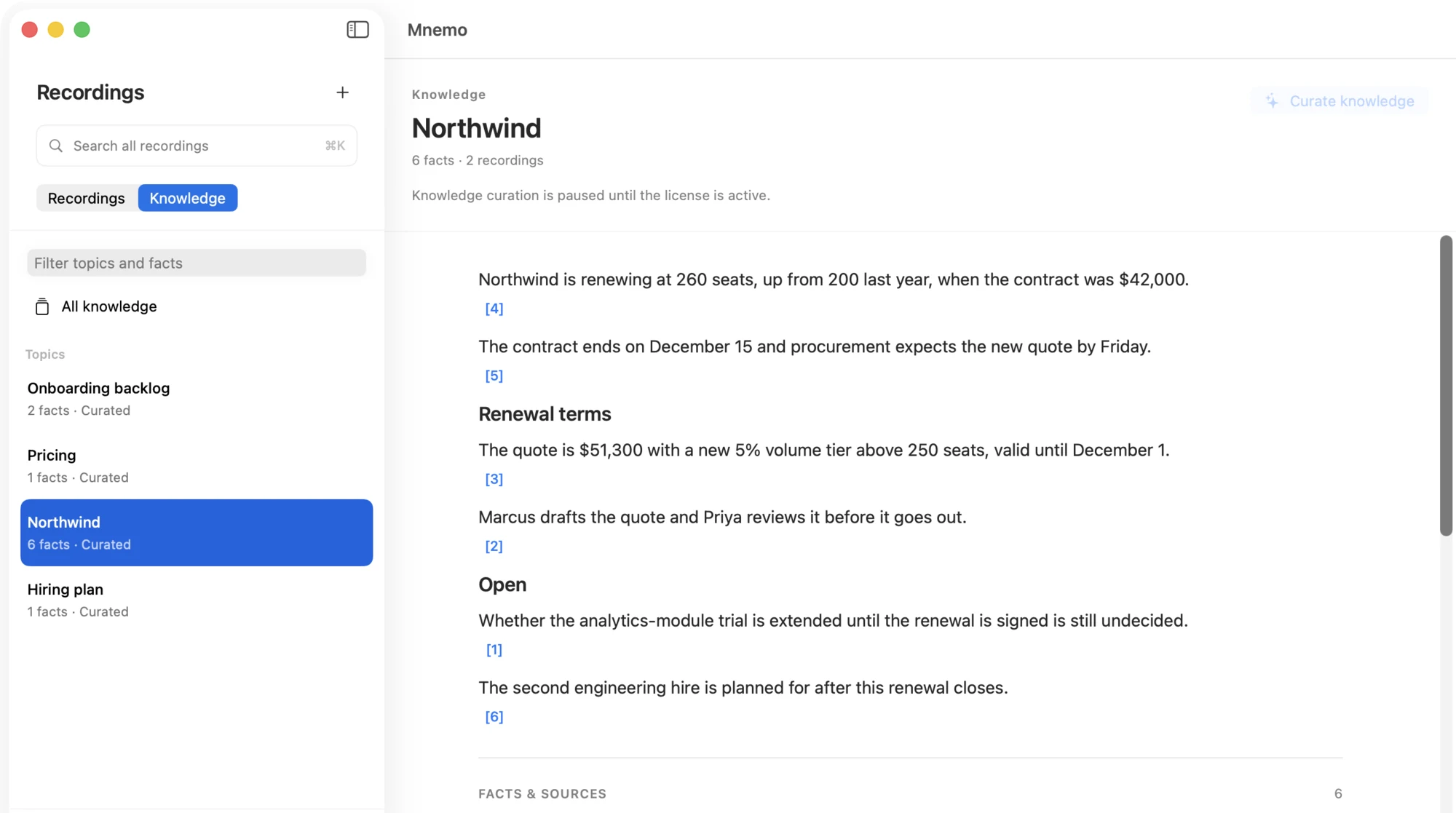
A knowledge base that remembers across meetings
After each recording, Mnemo extracts the facts — decisions, numbers, commitments, open questions — and files them under topics, people and projects. Say the same thing in three meetings and it becomes one fact with three sources.
- Every statement on a topic page is footnoted to the recording and the exact time it was said. Click it; hear it.
- Newer statements supersede older ones without deleting them — the change itself is kept.
- ⌘K searches everything at once, by keyword and by meaning, across all recordings.
$ mnemo status
Knowledge base  14 claims · 7 pages · 6 entities
Agent layers    knowledge on · summary on · transcript off

$ mnemo search "Northwind renewal"
1. Quote Northwind $51,300 with a 5% tier above
   250 seats, valid until December 1.
   decision · FB925C2A @ 0:28
2. Northwind's contract ends on December 15.
   number · FB925C2A @ 0:00

$ mnemo transcript FB925C2A --from 0:20 --to 0:40
error: transcript layer is off. Turn it on in
Mnemo › Knowledge › For agents.
Open to your agent — one layer at a time
Mnemo ships a small command-line tool, mnemo, and a ready-made skill for Claude Code and Codex. Your agent can ask about last week’s decisions or pull the exact wording from a call — but only through the layers you switch on.
- Three switches: knowledge base (on), summaries (on), transcripts (off by default, because they contain other people’s words).
- Audio, voiceprints and device credentials have no output path at all. The CLI never opens those files.
- Install the skill with one click from inside the app; it links to the bundled tool, nothing is downloaded.
Built for people whose recordings can’t go to a vendor
Mnemo is for work that happens away from the desk and needs to be exact afterwards. Record it, walk back to your Mac, and the reading is already waiting.
Client conversations
Intake calls, negotiations, site visits. The audio goes from the recorder to your Mac and stops there — no third-party processor to disclose, no terms of service between you and the client. Every commitment in the notes points back to the moment it was made.
Interviews and expert calls
Long conversations full of numbers that must not drift. Mnemo keeps the figure, the speaker and the timestamp together, so “they said 260 seats” is a click away from hearing them say it. Ten interviews on the same company settle into one topic page.
Lectures, courses, podcasts
Three hours of lecture become chapters split at the natural pauses, each with its own summary. Ask “what did the professor say about log matching?” months later and get the passage, not a guess — then play it.
Drive notes and voice memos
The plan you talked through on the way home is a summary and three action items by the time you’ve parked. Your own agent can read the knowledge layer and remind you — without ever seeing the audio.
Mnemo processes recordings after the fact; it does not do live transcription. Working from the full recording is what lets it label speakers, keep numbers straight and file facts across meetings.
Not a promise you have to take on faith
Your recordings, transcripts, summaries, knowledge base and voiceprints stay on this Mac. They are never uploaded. Transcription and summarization talk to local services over 127.0.0.1 and nowhere else.

Check it yourself, in two minutes
The shield in the sidebar opens Network Activity: a count of every request that has left this Mac since launch, and the list behind it — host and category only. Turn off Wi-Fi, import the bundled 20-second sample, watch the transcript and summary appear, and the count stays at zero.
- The list is Mnemo’s own ledger, not a packet capture; it never records request bodies, tokens, paths or serial numbers.
- Optional: delete the original audio automatically once processing is done. Transcript, summary and facts stay.
- Voiceprints are off by default, destroyed when you withdraw consent, and never exported.
| Purpose | When | What is sent | Never sent |
|---|---|---|---|
| Authorization service | Activating or renewing a license (every 30 days); binding a device for the first time; refreshing a device signature | Machine ID, license and seat, device serial and model, contact email | Recordings, transcripts, summaries, knowledge base, voiceprints |
| Direct device signature (optional; not normally needed) | Only after you sign in to your own Plaud account | Your own Plaud account credentials, device serial | |
| Public model download | First run, or when a model is missing (skippable; you may supply the files yourself) | The download request itself | |
| Update check | In-app updates, once a day | Version number |
Full text: Privacy policy. Data lives in ~/Library/Application Support/Mnemo/; local files are not encrypted at the application layer and rely on FileVault.
Buy it once. Keep it.
Start with the full product for 14 days. If it earns a place in your week, one payment covers this Mac for every 1.x release.
- One Mac; move the seat to a new Mac when you replace it
- Every 1.x update included, delivered inside the app
- Full 14-day trial first — nothing is cut down
- No account. One contact email for receipts and support
Buy from the License window inside the app when you are ready. Your key is shown on screen at checkout and emailed as a receipt.
- Offered to any Mac with a paid Mnemo 1 license
- Mnemo 1 keeps working if you don’t upgrade
- Named with a version number on purpose: you know what you bought
There is no subscription and no tier system. Mnemo 2 will be a paid upgrade, decided by you after reading what changed.
Purchases and upgrades are final. Refunds are made where the law requires them, for duplicate or erroneous charges, and for payment disputes. Use the trial to decide; it is the whole product.
Questions people ask before installing
Which recorders and Macs does it support?
Plaud recorders connected directly over Bluetooth, with Wi-Fi fast transfer for large batches. You can also import any audio file with the + button. Mnemo runs on Apple silicon Macs with macOS 13 or later; Intel Macs are not supported. Speech and language models take a few gigabytes of disk; more unified memory means faster summaries.
Do I need a Plaud account or the Plaud app?
No. Mnemo talks to the recorder itself. Binding a device needs a one-time device signature, which the Mnemo service handles without your Plaud account. Signing in to your own Plaud account exists only as an optional fallback; if you do, the token is stored in the macOS Keychain and deleted the moment you sign out.
Does it work offline?
Everything that touches your content does: sync, transcription, speaker labels, summaries, knowledge, search, playback, export. The internet is needed only for the four things in the table above — license activation every 30 days, first device binding, model download on first run, and the daily update check.
Is it real-time?
No. Mnemo processes a recording after it is finished — that is what lets it separate speakers, use the whole conversation for the summary and file facts across meetings. If you need a live transcript on screen during a meeting, this isn’t the tool.
Which languages?
Built and tested for English and Mandarin Chinese. The interface is available in both, and summaries follow the language of the recording rather than the interface.
Where is my data, and can I get it out?
In ~/Library/Application Support/Mnemo/: audio files, and plain JSON for the library and knowledge base. The bundled mnemo CLI exports the knowledge base as Markdown or JSON. Local files are not encrypted by the app; turn on FileVault for disk encryption.
What happens when the trial ends?
Reading, search, playback and export keep working. Device sync and new transcription, summaries and knowledge curation pause until a license is activated. Nothing already on the Mac is touched.
Can I move the license to another Mac?
Yes. A license has one active seat. Activating on a new Mac asks you to confirm the transfer and releases the old one.
Why isn’t it on the Mac App Store?
Direct download first: it is notarized by Apple, updates in place, and keeps Wi-Fi fast transfer, which the App Store sandbox does not allow. An App Store edition may follow later.
How do I get help or ask you to delete my email?
Write to hi@novabox.ai. Lost keys, deletion requests and questions all go there; deletion is done within 30 days.


